How YouTube Creator Partnerships Works in Google Ads: A Step-by-Step Breakdown

YouTube Creator Partnerships
YouTube Creator Partnerships in Google Ads
Influencer marketing has always had one glaring problem: it lives outside the advertising systems brands actually use to plan, run, and measure campaigns. A brand finds a creator through outreach or an agency, negotiates a deal, gets a sponsored video — and then has almost no way to tie that content back into its ad performance data.

Google is trying to close that gap. With YouTube Creator Partnerships now built directly into Google Ads, brands can search for creators, link sponsored videos to their ad accounts, and turn creator content into paid campaigns — all from the same dashboard they already use for search and display ads.

This guide covers what it is, how it rolled out, who can use it, how it works on both sides, and where it’s headed next.

What Exactly Is YouTube Creator Partnerships?

YouTube Creator Partnerships is a dedicated section inside Google Ads (and Display & Video 360) built to help advertisers find YouTube creators, manage collaborations, and plug the resulting content into paid campaigns — instead of treating creator marketing as a separate workflow.
At its core, it solves three long-standing headaches:
  • Discovery is inefficient. Brands rely on manual research, marketplaces, or personal networks to find creators.
  • Measurement is disconnected. Sponsored content performance rarely links back to a brand’s ad account.
  • Scaling content into ads is clunky. Turning an organic sponsored video into a paid ad traditionally meant separate negotiations and manual asset handling.

The bigger picture: influencer spend has historically flowed to agencies and platforms outside Google’s ecosystem. By making creator collaboration native to Google Ads Services, Google keeps more of that budget inside its own system, competes more directly with similar programs on TikTok and Meta, and adds authenticity to its ad inventory that algorithmic targeting alone can’t offer.

How the Rollout Happened: A Quick Timeline

  • January 2026: Google began testing the tools in a limited beta with select advertisers and channels.
  • April 2026: First major public spotlight at the YouTube NewFronts, framed as a way to discover, activate, and manage creator-driven ads within performance campaigns.
  • June 2026: Broad rollout — the core toolset became available in every market where the YouTube Partner Program operates.
  • Now: Still officially labeled “open beta,” meaning some functionality and edge cases may not be fully polished.

The Core Features, Explained

Inside Google Ads, the feature is accessed from Tools → YouTube Creator Partnerships, with up to four tabs depending on account eligibility: Overview, Creator search, Management, and Analytics.

Overview

A dashboard surfacing suggested sponsored creator videos already mentioning the brand, ready to review and link.

Creator Search

The headline feature — search for creators using natural-language queries and keywords, and review profiles with richer insights where creators have opted in. Results can be filtered by subscriber count, average views, content category, and geography. Note that audience or performance filters exclude creators who haven’t opted into sharing detailed insights, which can make result sets look smaller than expected. The goal is to move brands past subscriber counts (easy to inflate with one viral video) toward more meaningful engagement signals.

Management

Save creators to lists, track outreach and linking request status, and follow up on collaborations — the coordination layer that keeps things from falling through the cracks across a team.

Analytics

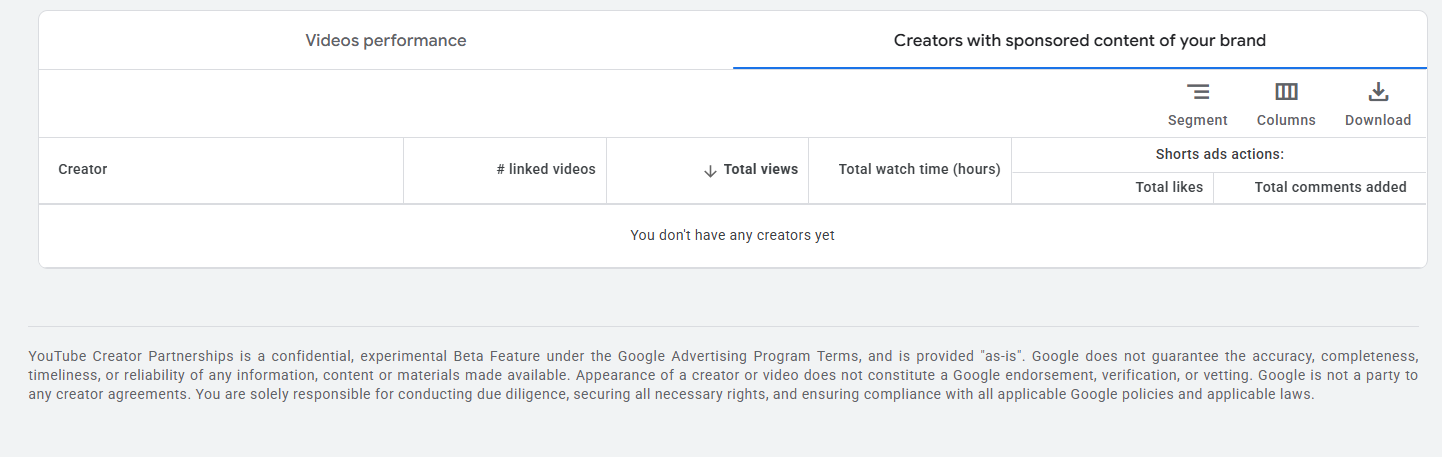
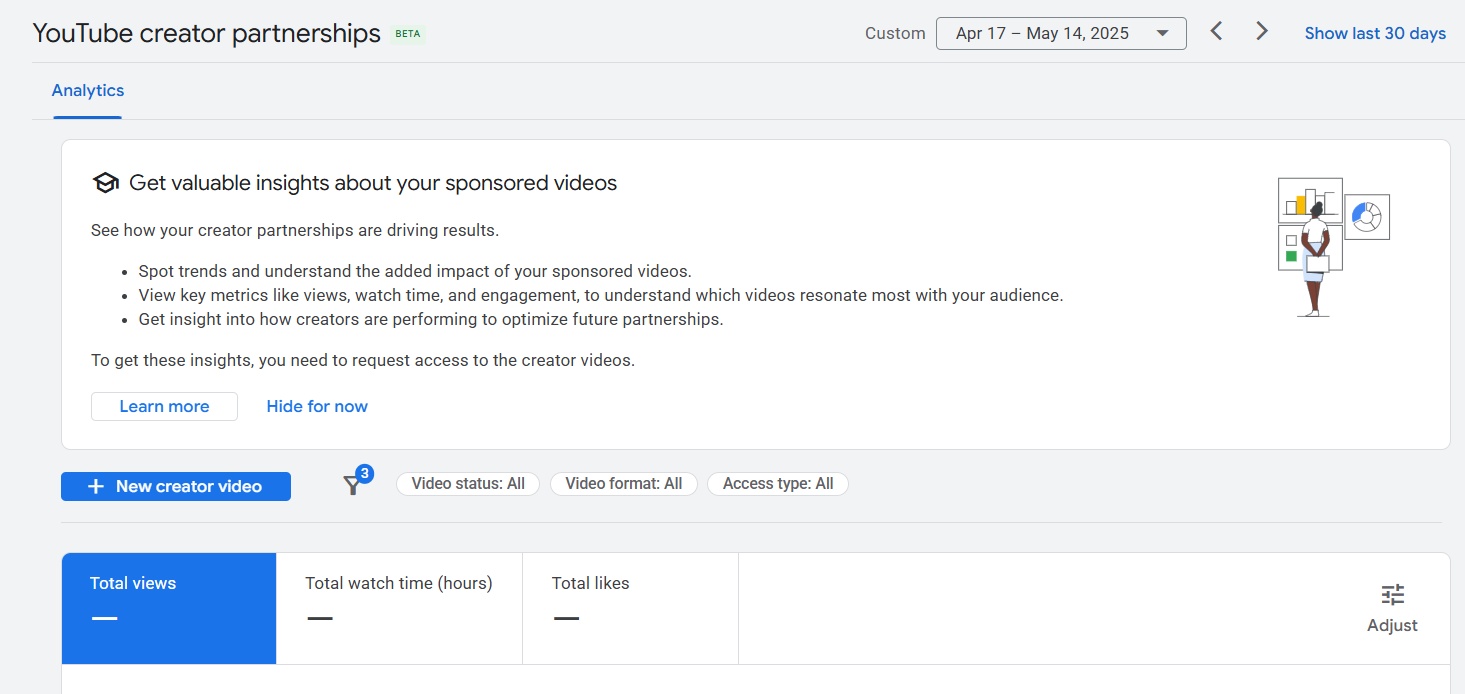
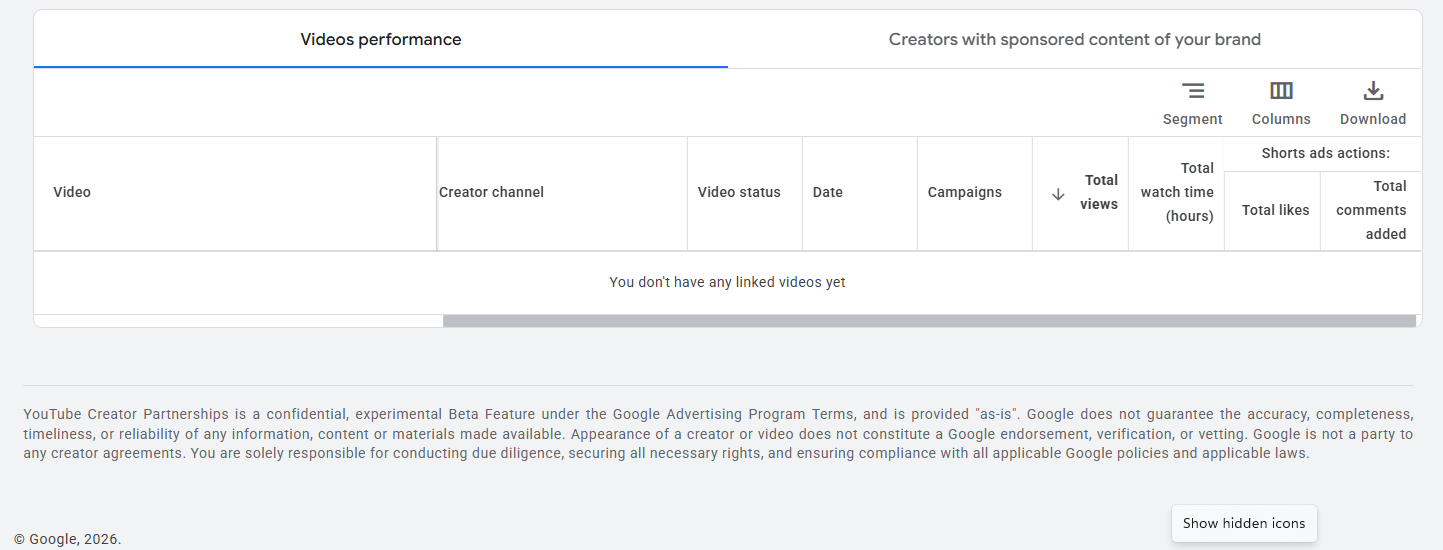
A combined view of organic and paid performance across two sub-views: Videos performance (video, creator channel, status, date, campaign, views, watch time, and “Shorts ads actions” covering likes and comments) and Creators with sponsored content of your brand (the same metrics rolled up by creator).
youtube creator partnerships analytics overview
YouTube Creator Partnerships in Google Ads
Data can be filtered by video status, format, and access type, and a “New creator video” option lets advertisers add a video manually. Metrics don’t populate on their own — the tool prompts advertisers to request access to a creator’s videos first.
youtube creator partnerships videos performance
YouTube Creator Partnerships in Google Ads

Creator Partnerships Boost

This is where discovery turns into performance. Once a creator grants brand partner access to a video, it can be used as an ad asset in paid campaigns. Not every feature is available across every campaign type, so check compatibility before planning around it.
youtube creator partnerships creators table
YouTube Creator Partnerships in Google Ads

Who Can Actually Use It

Advertisers need an active Google Ads account registered in a country where the YouTube Partner Program is active. Creators need active YPP membership — the Creator Partnerships tab then appears automatically in the “Earn” section of YouTube Studio.
One meaningful shift: Google removed minimum ad-spend thresholds and certain account-tier restrictions that used to gate access, opening the door to smaller and mid-sized advertisers.

How the Linking Process Actually Works

Officially called brand partner access, this can be set up from either side.

Brand-initiated: After a creator publishes a video, a brand (or its agency) can request access. The creator gets notified by email, push, and inbox alerts, and can accept, decline, or turn on automatic acceptance for future requests from that same brand.

Creator-initiated: From Create → Add details → Monetization → Paid promotion & brands, creators can select an already-reported brand deal, search for a new brand, or generate a shareable access code that auto-links the video once the brand clicks it.

Either way, granting access adds a “Paid promotion” label and shares select non-public metrics (views, watch time, engagement rate, demographics — split organic vs. paid) with the brand. Creators can revoke access anytime, which immediately stops metric sharing and disables Boost eligibility, though the brand may still be able to target ads to the video’s viewers through standard Google Ads targeting.

Revenue Sharing: How Creators Actually Get Paid

There are two separate money streams here, and only one touches Google’s standard revenue system:

1. Organic ad revenue (unaffected). Standard AdSense-style monetization — the usual YouTube Partner Program split between creator and YouTube — continues exactly as before. Granting or removing brand partner access doesn’t change it.

2. Paid promotion via Creator Partnerships Boost (handled outside the platform). When a brand pays a creator to use their video as a paid ad, that fee is negotiated directly between them as an offline agreement — the same way traditional sponsorship deals have always worked. Google isn’t a party to that payment and doesn’t take a cut of it; what Google earns is the standard ad spend the brand pays to run the campaign itself.

How Much Control Do Creators Have Over Ads?

Creators choose whether to grant a brand access at all (per video, per brand) and can revoke it anytime, immediately pulling the video from Boost eligibility. What they don’t do is approve each individual ad variation a brand builds afterward — that level of creative sign-off has to be negotiated separately as part of the offline deal. This is separate from the standard AdSense ad-exclusion controls creators already have, which aren’t affected by Creator Partnerships.

Step-by-Step: How Advertisers Use the Tool

  1. In Google Ads, go to Tools → YouTube Creator Partnerships
  2. Check the Overview tab for creator videos already suggested as relevant to the brand
  3. Use Creator search with keywords or natural-language queries to find additional creators
  4. Apply filters (subscribers, average views, category, location) to narrow the list
  5. Save promising creators to a list and track outreach status in the Management tab
  6. Reach out and finalize a partnership outside the platform
  7. Once a creator grants brand partner access to a video, use Creator Partnerships Boost to turn it into a paid ad asset
  8. Monitor combined organic and paid performance in the Analytics tab

Step-by-Step: How Creators Get Involved

  1. Confirm eligibility through YouTube Partner Program membership
  2. Check the “Earn” tab in YouTube Studio for the Creator Partnerships section
  3. Set a business contact email in preferences (optional but recommended)
  4. Adjust discoverability settings — note a creator may still surface to brands in some cases even with visibility settings off
  5. Grant access to a specific brand via Add details → Monetization → Paid promotion & brands — by selecting a reported deal, searching for the brand, or generating an access code
  6. Watch for brand-initiated requests via notification, and respond promptly (or enable automatic acceptance for repeat brands)
  7. Remove access at any point if a partnership ends

Real-World Use Cases

  • Competitive intelligence: Search for creators who’ve reviewed competitor products, then pitch a differentiated partnership.
  • Geo-targeted campaigns: Use location filters to find local creators for hyper-local awareness campaigns.
  • Audience quality verification: Filter by average views instead of subscriber count to spot genuinely engaged audiences.

Benefits for Each Side

For brands: one platform for discovery, linking, and activation; better data for evaluating creator fit before committing budget; a way to convert organic sponsored content into scalable paid ads; lower barrier to entry after the removal of minimum spend requirements.

For creators: a more structured path to brand deals without relying solely on agencies or cold outreach; more visibility to brands actively searching their category; clear disclosure and consent steps built into the process.

Limitations and Open Questions

  • Still in open beta — Google’s own in-tool disclaimer describes it as a confidential, experimental feature offered “as-is,” with no guarantee of accuracy or reliability
  • A creator or video appearing in the tool isn’t a Google endorsement — Google isn’t party to any resulting creator agreement, and advertisers are solely responsible for due diligence, rights, and compliance
  • Not all campaign types support every feature, and availability is tied to where the YouTube Partner Program operates
  • There’s no fully public, standalone creator-search tool outside Google Ads; discovery stays on the advertiser side

How It Compares to Other Advertising Models

Vs. traditional influencer marketing: Traditional brand-creator deals run through agencies, marketplaces, or direct outreach, disconnected from a brand’s ad infrastructure — performance data lives in spreadsheets, not dashboards. Creator Partnerships narrows that gap by folding creator content into a brand’s existing measurement and budgeting systems, without fully replacing agencies for negotiation or creative direction.

Vs. the standard Google Ads model: Regular YouTube advertising uses automated auction targeting — a brand sets criteria like topic or audience, and ads run against any matching content with no relationship to the individual creator. Creator Partnerships requires explicit creator consent, turns the video itself into the ad creative, and is built around an identifiable brand-creator relationship — a curated layer sitting on top of the same underlying auction infrastructure, not a replacement for it.

Where This Is Likely Headed

  • Expansion into more countries as the YouTube Partner Program grows
  • Deeper integration with automated, AI-driven campaign types
  • A gradual move from “open beta” to a permanent part of Google Ads

FAQ

The discovery and management tools are free. Running a Boost campaign uses your normal Google Ads budget at standard auction pricing — the platform itself isn’t pricier. What can add to total spend is the separate fee paid to the creator for usage rights.
Not yet — access depends on whether the YouTube Partner Program is active in a given market, though Google has signaled plans to expand coverage.
No. Google removed minimum spend requirements that previously limited access to larger advertisers.
No. Organic reach depends on algorithm signals like watch time and engagement, while boosted performance comes from a brand’s separate budget and targeting — the two run independently, and boosting can help by exposing the video to new viewers.
No. That fee is a private, offline agreement between brand and creator. Google only earns the standard ad spend for running the campaign itself.
Related in spirit, distinct in execution — this is built directly into Google Ads and Display & Video 360, focused on connecting creator content to paid campaigns rather than functioning as a standalone marketplace.
Still in open beta. Core features are broadly available, but functionality and review processes may continue to evolve.